Odoo module
The iframe plugin and the neighbourhood text as Odoo website building blocks and QWeb templates: map, points of interest, travel times and a written, indexable description of the neighbourhood on your property pages, configured from Odoo instead of URL parameters.
Install
The module is yatmo_map, for Odoo 17.0, 18.0, 19.0 and 20.0 (Odoo.sh or on-premise; Odoo Online does not accept third-party modules). Download the zip for your version from the Odoo Apps store, put the yatmo_map folder in your addons path, update the apps list and install Yatmo Neighbourhood Map. It depends on the Website app only.
Then open Website > Configuration > Settings, section Yatmo neighbourhood map: enter your license key and choose your country, the language (by default the language of the page), the default layout and look, the optional modules and the neighbourhood text defaults. Every block and template starts from these defaults.
Building blocks
In the website builder, drag the Content group onto the page and pick Yatmo Map (Odoo 17 lists the block directly). In the block options, type the property address (found by Yatmo in the country of the block) or its coordinates: the preview updates. The same panel holds every option of the iframe plugin: layout, height, zoom, map style, accent colour, rounded corners, pin or circle, isochrones and routes, country and language. Anything left empty follows the settings.
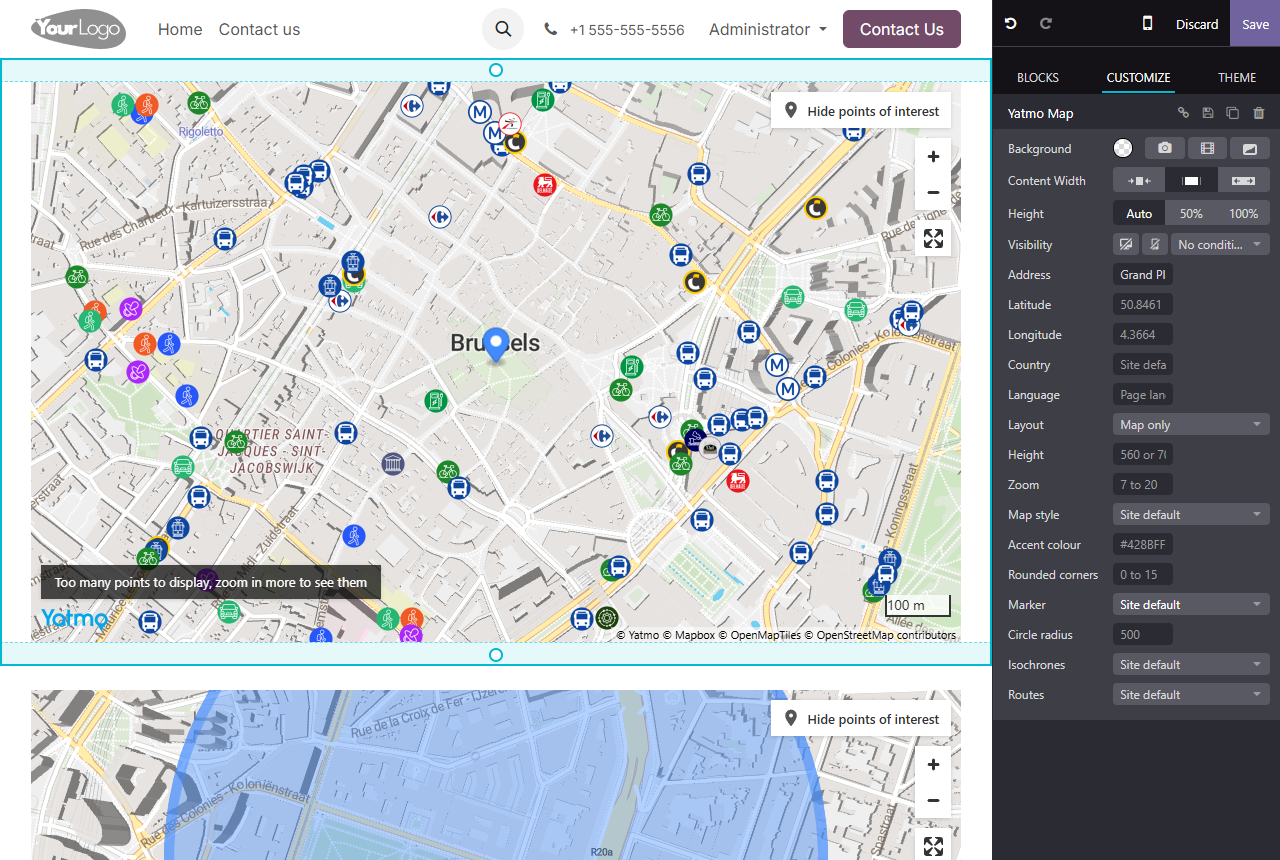
The map itself is an iframe mounted when the page loads, from the block’s attributes and your settings: your license key is never written into the saved page, and a change of key or of defaults applies to every existing page at once.
Neighbourhood text
The Yatmo Text block is in the Text group. Give it the same address or coordinates and choose the paragraphs (education, shopping, public transport, roads, leisure, nearby cities), the heading level, and whether the street and city names appear in the first two headings. The text is generated by Yatmo while you edit and written into the page as ordinary headings and paragraphs, styled by your theme. It is regenerated whenever an option changes, and on the Refresh the text button; it is not editable by hand, since the next refresh would overwrite it.
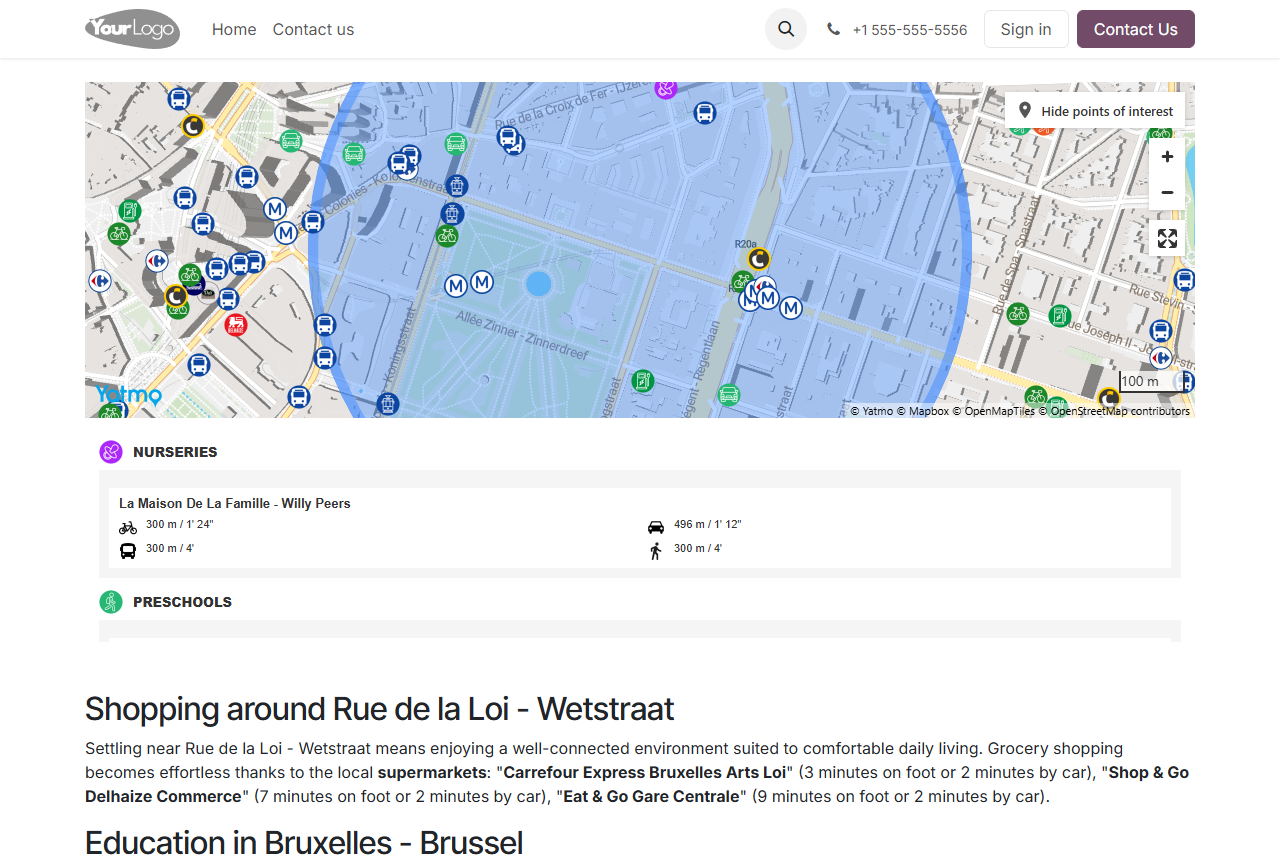
The text exists in the languages of the property’s country (French, Dutch and English in Belgium, for example), otherwise in English.
Templates and Python
Property pages generated from your own model (or from products) call the two QWeb templates from any website view. Everything is rendered on the server at request time: the text is cached for 30 days per location, the geocoding for 90 days.
<t t-set="yatmo" t-value="{'latitude': property.latitude, 'longitude': property.longitude, 'mode': 'map-top', 'marker': 'circle'}"/>
<t t-call="yatmo_map.map"/>

<t t-set="yatmo" t-value="{'address': property.street + ', ' + property.city, 'paragraphs': 'education,shopping,publictransports', 'heading': 'h3'}"/>
<t t-call="yatmo_map.text"/>
Set yatmo just before the t-call (a t-set inside the call body is not passed on by Odoo 20). The dict takes the keys listed below; everything left out comes from the settings. From Python, the same service is env['yatmo.map']:
yatmo = env['yatmo.map']
html = yatmo.render_map({'latitude': 50.8461, 'longitude': 4.3664})    # Markup of the iframe, or '' for visitors
text = yatmo.render_text({'address': 'Rue de la Loi 16, 1000 Bruxelles', 'language': 'FR'})
params = yatmo.build_params({'latitude': 50.8461, 'longitude': 4.3664})  # dict of iframe parameters
location = yatmo.geocode('Rue de la Loi 16, 1000 Bruxelles', 'BE', key)  # {'lat': ..., 'lng': ...} or None
All keys
Keys of the yatmo dict. In the blocks, the same keys are data attributes of the section (data-yatmo-address, data-yatmo-accent-color...), set by the options panel. Each maps to a parameter of the iframe plugin.
| Name | In | Type | Description |
|---|---|---|---|
| address | string | Property address, located by the Yatmo geocoder in the selected country. Looked up once, then cached for 90 days. | |
| latitude / longitude | number | Property coordinates. Take precedence over the address. A decimal comma is accepted. | |
| country | string | Country code (BE, FR, UK...). Default: the settings. | |
| language | string | Language code (EN, FR, NL...). Default: the language of the page. | |
| mode | string | overlay, overlay-scores, map-top, map, summary or summary-tabs. See display modes. | |
| height | string |
Pixels (560) or a CSS length (70vh). The width fills the content column.
Default: 560. |
|
| zoom | integer 7-20 |
Initial zoom.
Default: 15. |
|
| map_style | integer 1-7 |
Basemap style.
Default: 1. |
|
| marker | string |
pin, circle (with circle_radius in metres, 50 to 2000) or custom (with custom_marker_url, custom_marker_width, custom_marker_height).
Default: pin. |
|
| accent_color | string |
Hex colour of the pin and highlights.
Default: #428BFF. |
|
| summary_background_color / summary_line_color | string | Hex colours of the summary background and separator lines. | |
| rounded | integer 0-15 |
Corner radius in pixels.
Default: 0. |
|
| isochrone | string | left, right or off. See Isochrones. | |
| route_from | string | left, right, popup or off. | |
| title | string | Accessible title of the iframe. | |
| css_class | string | Extra CSS class on the wrapper. | |
| paragraphs | string |
Text only. Comma-separated among education, shopping, publictransports, transports, tourism, cities. Default: the settings (all six).
|
|
| heading | string |
Text only. Heading level of each paragraph title, h2 to h6.
Default: h3. |
|
| street_in_title / city_in_title | 0 / 1 |
Text only. Street name in the first heading, city name in the second. Set to 0 when the exact address must stay private.
Default: 1. |
Favourite addresses are switched on in the settings: for logged-in visitors, the module passes a hash of their Odoo user id as userId. See Favorite addresses.
Search engines
The neighbourhood text is part of your page’s HTML, whether it comes from the block (written into the page when you edit it) or from the template (rendered on the server at each request, from a 30-day cache): search engines and AI assistants read it as part of your listing, with the keywords in <strong>. The summary panel inside the map widget is not indexed, since the widget is an iframe; use both for the best of both.
Odoo versions
One package per Odoo series: 17.0, 18.0, 19.0 and 20.0. The blocks follow each version’s website builder (the legacy one in 17 and 18, the new one in 19 and 20); the options, the templates and the Python service are the same everywhere. Install the package of your series.